Common Cybersecurity Threats and Practical Ways to Stay Protected
Cybersecurity threats can affect anyone, from casual email users to growing businesses, but the good news is that a few smart habits can make a big difference. Learn how to spot common attacks and take practical steps to protect your accounts, devices, and personal information.
By: Peter on July 30, 2026
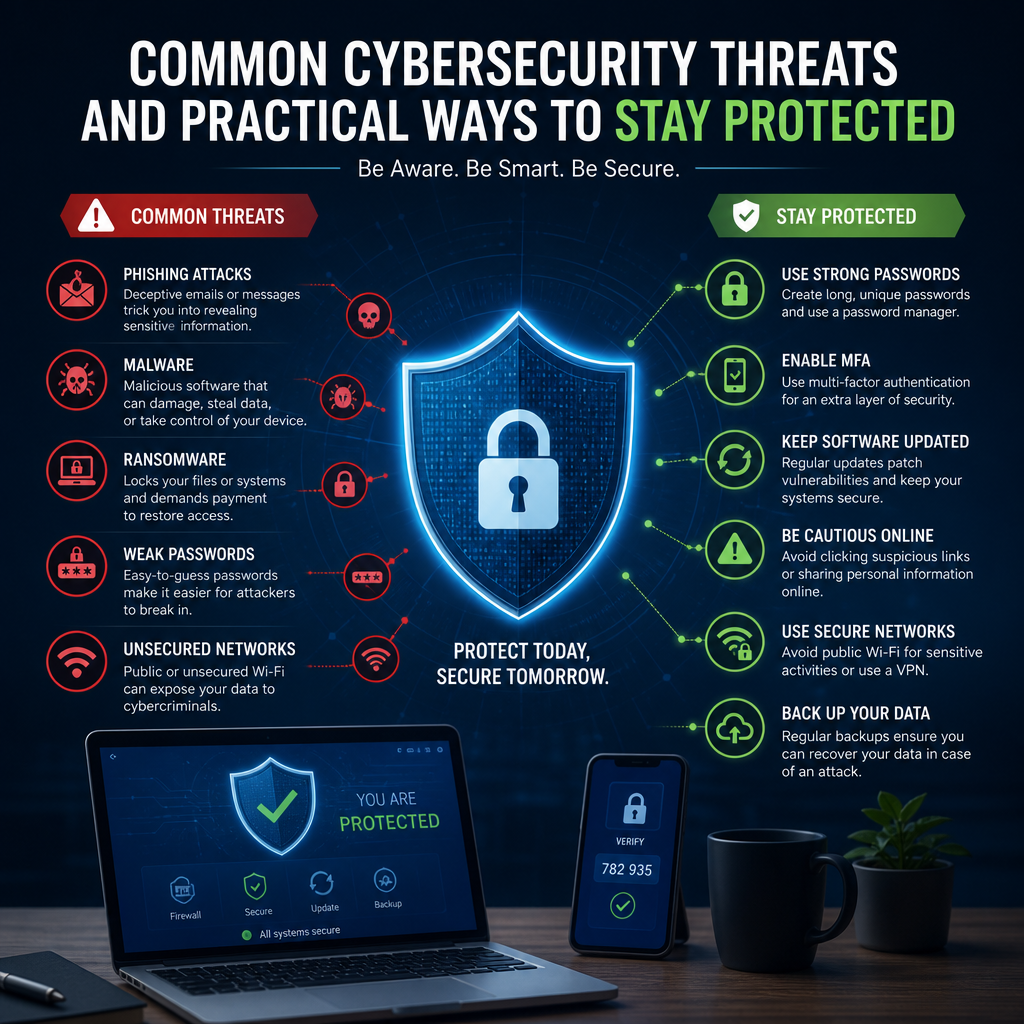
Cybersecurity affects everyone who uses email, shops online, stores files in the cloud, or manages a business website. The good news is that understanding the most common cybersecurity threats makes it much easier to reduce your risk. You do not need to be a security professional to build strong habits. With the right precautions, you can protect your accounts, devices, and personal information from many of today’s most common attacks.
This guide breaks down the biggest threats in plain language and explains practical steps you can take right away. Whether you are protecting a home computer, a small business, or a team of remote workers, these strategies can help you stay safer online.
Why Cybersecurity Threats Keep Evolving
Cyber threats change because attackers constantly adapt. As people improve password security, criminals move to phishing. As companies deploy filters, attackers turn to social engineering, malicious links, or fileless malware. The methods change, but the goal stays the same: steal data, access accounts, or disrupt systems.
That is why cybersecurity is not a one-time task. It is an ongoing habit built from small, consistent actions such as updating software, using multi-factor authentication, and learning how to spot suspicious messages.
Common Cybersecurity Threats You Should Know
Phishing Attacks
Phishing is one of the most common cybersecurity threats. In a phishing attack, someone pretends to be a trusted source such as a bank, delivery company, coworker, or cloud service provider. The goal is to trick you into clicking a malicious link, opening an infected attachment, or entering login credentials on a fake website.
Phishing often arrives through:
Email
Text messages
Social media messages
Fake login pages
Phone calls that pressure you to act quickly
How to stay protected:
Check the sender’s address carefully.
Hover over links before clicking.
Avoid opening unexpected attachments.
Go directly to the official website instead of using a message link.
Slow down if the message creates urgency, fear, or excitement.
A common example is a message claiming your account will be locked unless you “verify now.” Real companies rarely push you into immediate action through a random message.
Malware
Malware is a broad term for malicious software designed to damage, spy on, or take control of devices. It includes viruses, worms, trojans, spyware, and ransomware. Malware may sneak in through infected downloads, pirated software, unsafe browser extensions, or fake updates.
How to stay protected:
Install software only from trusted sources.
Keep your operating system and apps updated.
Use reputable antivirus or endpoint protection software.
Avoid suspicious pop-ups that tell you to download “security tools.”
Back up important files regularly.
One practical example: if a website asks you to install a file to view a document, stop and verify the source first. That file may be malware disguised as something harmless.
Ransomware
Ransomware is a type of malware that locks files or entire systems and demands payment for restoration. It can affect individuals, schools, hospitals, and businesses. Even if a ransom is paid, recovery is never guaranteed.
How to stay protected:
Keep offline and cloud backups of important files.
Restrict user permissions so not everyone can access everything.
Patch software and devices quickly.
Train users to avoid suspicious attachments and downloads.
Use security tools that can detect unusual file activity.
Backups are critical here. If ransomware hits, a clean backup can mean the difference between a short disruption and major data loss.
Password Attacks
Weak, reused, or stolen passwords give attackers an easy entry point. Common password attacks include brute-force attempts, credential stuffing, and password spraying. In many cases, criminals use login information stolen from one breach to try accounts on other sites.
How to stay protected:
Use unique passwords for every account.
Create long passphrases instead of short, complex strings.
Change passwords immediately if you suspect compromise.
A strong password manager makes this much easier. It helps you create and store unique credentials so you do not have to remember them all yourself.
Social Engineering
Social engineering relies on human trust rather than technical hacking. Attackers manipulate people into giving away information, approving payments, resetting passwords, or sharing access. It can happen by email, phone, text, or in person.
Common tactics include:
Pretending to be IT support
Claiming to be a manager or executive
Requesting urgent wire transfers
Asking for password resets or MFA codes
Impersonating vendors or clients
How to stay protected:
Verify requests through a separate communication method.
Set internal approval steps for payments or sensitive changes.
Train employees to question unusual urgency.
Never share one-time authentication codes.
Establish a “call-back” procedure for financial or account changes.
The strongest defense against social engineering is verification. If a request feels off, confirm it before taking action.
Unpatched Software and Vulnerabilities
Software vulnerabilities are flaws attackers can exploit to gain access, execute code, or steal data. When software is not updated, those weaknesses remain open. This applies to operating systems, browser extensions, plugins, mobile apps, routers, and even smart home devices.
How to stay protected:
Turn on automatic updates.
Replace unsupported software and devices.
Remove apps and plugins you no longer use.
Track firmware updates for routers and IoT devices.
Test updates in business environments before large rollouts when necessary.
Outdated software is one of the easiest ways for attackers to get in. Patch management is not glamorous, but it is one of the most effective defenses available.
Public Wi-Fi Risks
Free Wi-Fi at airports, hotels, coffee shops, and other public spaces can be convenient, but it may expose your data if the network is poorly secured or set up to intercept traffic.
How to stay protected:
Avoid logging into sensitive accounts on public Wi-Fi when possible.
Use a trusted virtual private network (VPN) if appropriate for your situation.
Turn off auto-connect for open networks.
Forget public Wi-Fi networks after use.
Use mobile data for banking or other high-risk activities when practical.
If you must connect to public Wi-Fi, treat it like a crowded room. Assume others may be able to observe or interfere with your activity.
Practical Ways to Stay Protected Every Day
Strengthen Your Account Security
Account protection starts with strong authentication. Passwords alone are no longer enough for most users.
Do this first:
Use a password manager.
Create long, unique passwords.
Turn on multi-factor authentication.
Review account recovery options.
Check for unfamiliar login activity regularly.
Multi-factor authentication adds a second layer of defense, such as a code from an app or a security key. Even if someone steals your password, they still need that second factor.
Keep Devices and Software Updated
Updates often include security fixes that close known vulnerabilities. Delaying them gives attackers more time to exploit old weaknesses.
A simple routine helps:
Enable automatic updates on laptops, phones, and tablets.
Update browsers, extensions, and apps.
Reboot devices when required.
Review firmware updates for routers and smart devices.
If you manage devices for a household or a small team, schedule monthly checks so nothing is left behind.
Back Up Data Regularly
Backups are one of the best recovery tools for both cyberattacks and accidental loss. Use more than one backup method when possible.
A practical backup plan often includes:
A cloud backup
An external drive backup
A version history system for critical files
For business use, test your restores periodically. A backup is only useful if you can recover data from it.
Practice Safer Email and Web Browsing Habits
Email and web browsing are two of the most common entry points for attacks.
Safer habits include:
Avoid clicking unexpected links
Check website addresses before entering credentials
Use browser security warnings as a signal to stop and verify
Download only from official vendor sites
Watch for spelling errors, odd formatting, and unusual urgency in messages
If a message claims to be from a service you use, open a new browser tab and log in directly. Do not rely on the link in the message.
Train People, Not Just Devices
Technology helps, but people often determine whether an attack succeeds. Training is essential for families, teams, and organizations.
Good security awareness training should cover:
Phishing recognition
Safe password habits
Verification procedures for sensitive requests
Reporting suspicious activity
How to respond to lost devices or suspected compromise
If one person in a household or company ignores security rules, that can put everyone at risk. Make security a shared responsibility.
Cybersecurity Threats for Small Businesses and Remote Teams
Small businesses are frequent targets because attackers assume they may have fewer resources than larger companies. Remote teams also face added risk because employees use home networks, personal devices, and cloud tools from multiple locations.
Helpful Steps for Small Businesses
Require multi-factor authentication for email, banking, and admin accounts
Limit access by role
Keep a list of approved software and devices
Use endpoint protection on all company devices
Write a basic incident response plan
Review vendor security before sharing sensitive data
Helpful Steps for Remote Workers
Separate work and personal accounts
Use a secure home Wi-Fi password and router settings
Avoid installing unapproved apps on work devices
Lock screens when stepping away
Report suspicious messages quickly
Remote work can be secure, but only if people use the same caution outside the office that they would inside it.
What to Do If You Suspect a Cyberattack
If something seems wrong, act quickly. Early response can limit damage.
Follow these steps:
Disconnect the affected device from the internet if needed.
Change passwords from a clean device.
Notify your IT team, bank, or service provider.
Check for unauthorized transactions or account activity.
Restore from a clean backup if files were damaged.
Report the incident to appropriate authorities when necessary.
For identity theft or consumer fraud in the United States, report the issue to official agencies and affected companies right away. Speed matters.
Building Better Cybersecurity Habits Over Time
You do not need perfect security to reduce risk. You need consistent habits. Start with the biggest wins first: stronger passwords, multi-factor authentication, updates, and backups. Then add awareness training, safer browsing habits, and better device management.
Think of cybersecurity like home safety. You lock doors, install smoke alarms, and keep valuables out of sight. Online protection works the same way. Small steps add up to strong defense.
Frequently Asked Questions
1. What are the most common cybersecurity threats today?
The most common cybersecurity threats include phishing, malware, ransomware, weak-password attacks, social engineering, and unpatched software vulnerabilities. Public Wi-Fi risks and unsafe downloads also remain common. These threats succeed because they target both technical weaknesses and human behavior.
2. How can I tell if an email is a phishing attempt?
Look for signs such as unfamiliar sender addresses, urgent language, spelling mistakes, unexpected attachments, and links that do not match the official website. If the message asks you to verify credentials or payment information, go directly to the company’s official site rather than clicking the message link.
3. Is antivirus software enough to stay protected?
Antivirus software is helpful, but it is not enough by itself. You also need strong passwords, multi-factor authentication, regular updates, backups, and careful browsing habits. A layered approach gives you much better protection than relying on one tool.
4. Why is multi-factor authentication so important?
Multi-factor authentication adds another barrier between attackers and your accounts. Even if someone steals your password, they still need the second factor, such as an app-generated code or security key. This significantly reduces the chance of unauthorized access.
5. What should I do if I think my device has been infected with malware?
Disconnect the device from the internet if possible, stop using it for sensitive tasks, and run a scan with trusted security software. Change passwords from a different clean device, watch for suspicious account activity, and restore files from a known-good backup if needed. If the issue affects work systems, notify IT immediately.
Cybersecurity does not have to feel overwhelming. Once you understand the most common threats—phishing, malware, ransomware, password attacks, social engineering, and software vulnerabilities—you can take practical steps to reduce your risk. The most effective defenses are often the simplest: use unique passwords, enable multi-factor authentication, keep devices updated, back up important data, and pause before clicking suspicious links.
These habits protect more than just your files. They help safeguard your privacy, financial accounts, work systems, and peace of mind. For businesses and remote teams, they also support continuity and reduce costly disruptions. Cybersecurity is strongest when it becomes routine, not reactive.
Start with one or two improvements today, then build from there. Small changes made consistently can dramatically improve your security posture over time. The more familiar you become with warning signs and best practices, the better prepared you will be to recognize threats early and respond with confidence.
Peter B holds a degree in Journalism and has 5 years of experience covering U.S. economic policy, labor markets, and financial news. He writes data-driven news content on topics like inflation, interest rates, and employment trends.